Docker for Developers Who Just Need It to Work
Containerize your first app without cargo-culting a 12-layer config from Stack Overflow
 Serhii MalyshevSoftware architect and tech lead7 min read · May 30, 2026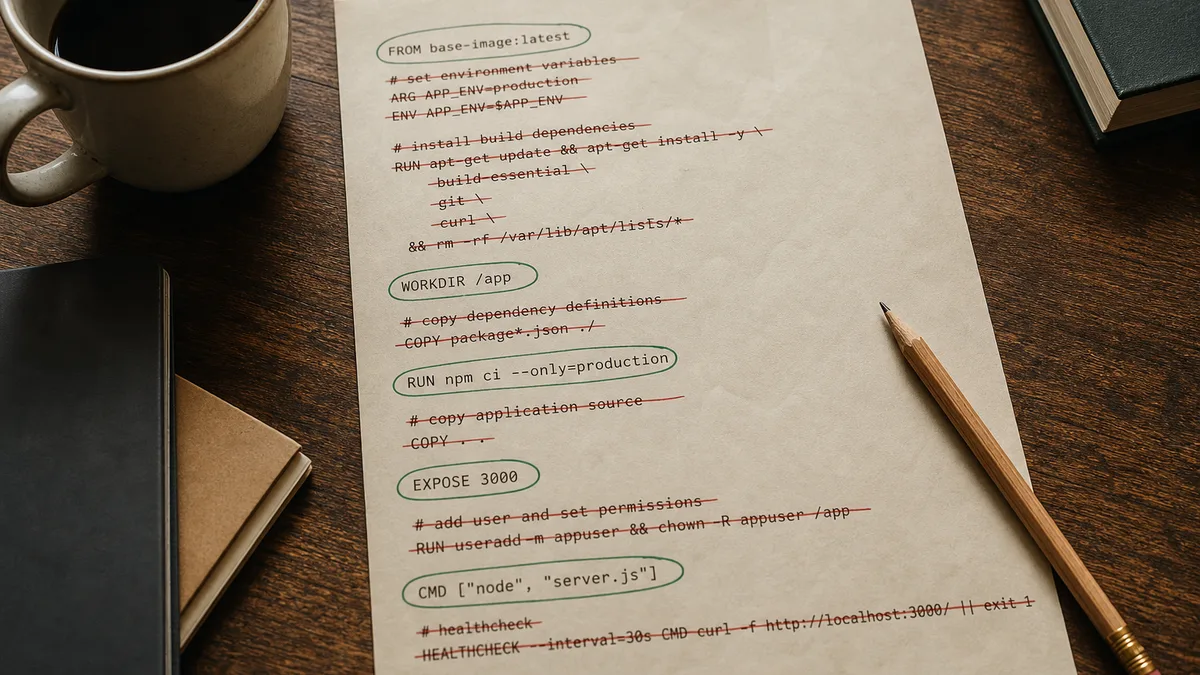
Here's an uncomfortable truth: most developers who "use Docker" have never containerized their own app. They pasted a Dockerfile from a gist, changed three paths, watched docker build fail twice, swapped the base image tag, and declared victory when the container stayed up for eleven minutes. The file has forty lines. They can explain maybe nine.
That isn't competence. It's Dockerfile archaeology — digging through layers someone else stacked for a different repo, a different CI system, a different security audit. The config runs, which feels like success, until the first dependency bump invalidates half the cache or a teammate asks why you're running as root in production when the app is a local Express API with twelve routes.
The Stack Overflow answer wasn't wrong for that question. It was wrong for your Tuesday.
You don't need a production hardening checklist on day one. You need three mental models, one Dockerfile you can read aloud, and a compose file for the database you're tired of installing by hand. Everything else — multi-stage builds, distroless bases, image scanning — is phase two.
Three mental models — not three hundred flags
Docker tutorials love feature tours. Skip the tour. Three ideas. Hold them and the rest clicks.
Image — a read-only recipe. You build it once with docker build; it layers filesystem snapshots from your Dockerfile instructions. Think template, not running process — images vs containers in Docker's own terms.
Container — a running instance of that image. Isolated process, own filesystem view, own network port mapping. Same image, many containers, or one — your call. Delete a container and the image remains. Delete the image and you rebuild from the Dockerfile. Docker defines a container as an isolated process with everything it needs bundled in.
Compose — one YAML file that starts the app container and the Postgres container and wires the network between them. Compose v2 is the docker compose command (space, not hyphen). If you're still copy-pasting three docker run commands from shell history, you're doing it the hard way. The Compose file reference is the spec; you don't need to memorize it on day one.
Containers share the host kernel. They're not VMs. You're not booting a second operating system — you're namespacing a process with its dependencies bundled. That distinction matters when someone tells you Docker is "too heavy" for a laptop. A bloated Dockerfile is heavy. A minimal one isn't.
That's the whole map. Build an image. Run a container. Add Compose when a second service shows up.
Minimum Viable Dockerfile — layer order beats lore
Assume a small Express API: package.json, src/index.js, listens on port 3000. No webpack circus. Here's a Dockerfile that works and fits on a sticky note:
FROM node:20-alpine

WORKDIR /app

COPY package.json package-lock.json ./
RUN npm ci --omit=dev

COPY . .

EXPOSE 3000
CMD ["node", "src/index.js"]
Fifteen lines. Pin the base (node:20-alpine, not latest). Workdir, manifests, install, source, expose, run. Unpinned tags make builds non-reproducible — still a common footgun.
The order is the lesson. Docker caches each instruction as a layer. Change a line and every layer after it rebuilds. Copy package.json and run npm ci before COPY . . so a one-character edit in src/index.js doesn't re-download the internet. Docker's build best practices call this out explicitly: dependency manifests before source. Paste a config that copies source first and you'll blame Docker for being slow when the problem is layer order.
Add .dockerignore now — not after your build context hits 800MB:
node_modules
.git
.env
*.md
Same idea as .gitignore. Without it, COPY . . sends node_modules, git history, and your local secrets into the build context. Docker isn't magic; it's copying files you told it to copy.
If docker build hangs before the first RUN prints anything, check context size. Run docker build with plain progress or inspect .dockerignore — a forgotten .git directory can balloon the upload to a gigabyte before a single instruction executes.
Build and run:
docker build -t my-api .
docker run --rm -p 3000:3000 my-api
Hit localhost:3000. If it responds, you containerized an app.
Not a platform. An app.
Pro Tip: docker run --rm deletes the container when it stops. Fewer orphaned containers cluttering docker ps -a.
The Cargo-Cult Layer Tax — what to skip on day one
Stack Overflow Dockerfile answers are written for the question asked — "how do I fix this CVE," "how do I shrink a 2GB Java image," that sort of thing. Drop them into a greenfield Node project and you inherit someone else's war stories.
Skip these on day one:
- Multi-stage builds — official best practice for production images, not a learning prerequisite. Add a
builderstage when your final image carries compilers or devDependencies you don't want in prod — not before you can explain your single-stage file. - Distroless / scratch final stages — great for attack-surface minimalism. Miserable when you're learning and need
shinside the container to debug. - Non-root
USER— do it before you deploy anywhere shared; skip the lecture while you're still learning whatWORKDIRdoes. - Health checks, SBOM scans, BuildKit secret mounts — real tools. Not your Tuesday afternoon getting
docker runworking.
I call the extra lines Cargo-Cult Layer Tax — each instruction you can't justify costs future-you a debugging hour. Production hardening belongs in phase two, when you have a deploy target and a reason. Until then, a six-line Dockerfile that rebuilds fast beats a forty-line one that looks enterprise.
When does multi-stage pay off? When npm ci plus your source plus build tooling lands a 900MB image and you only need dist/ and production deps in the runtime stage. Docker's docs show the pattern: FROM node:20 AS builder, then COPY --from=builder into a slim final stage. Learn single-stage first. Refactor when the image size shows up in docker images.
Compose for the database — localhost is the wrong hostname
Your API probably talks to Postgres. Installing Postgres locally is the tax Docker was invented to dodge. One compose.yml:
services:
  app:
    build: .
    ports:
      - "3000:3000"
    environment:
      DATABASE_URL: postgres://app:secret@db:5432/appdb
    depends_on:
      db:
        condition: service_healthy
    volumes:
      - .:/app
      - /app/node_modules

  db:
    image: postgres:16-alpine
    environment:
      POSTGRES_USER: app
      POSTGRES_PASSWORD: secret
      POSTGRES_DB: appdb
    volumes:
      - postgres_data:/var/lib/postgresql/data
    healthcheck:
      test: ["CMD-SHELL", "pg_isready -U app -d appdb"]
      interval: 3s
      timeout: 3s
      retries: 5

volumes:
  postgres_data:
Two services. App builds from your Dockerfile. Database pulls a pinned image. They share a Compose network — hostname db resolves inside the app container.
Dev bind mount vs prod image. The volumes: - .:/app line mounts your source for hot reload. That's a development trade: code on your machine drives the container filesystem. Your production deploy should run the image you built, not a live folder sync. Compose for local; CI builds the image for prod. Different jobs.
Named volumes. postgres_data survives docker compose down. Your schema sticks around between restarts. docker compose down -v wipes it — useful for a clean slate, catastrophic if you forgot the flag. I've watched someone re-run migrations for an hour before noticing the volume got deleted.
Healthchecks and depends_on. Without condition: service_healthy, the app container starts while Postgres is still booting. Connection refused. Developer blames Docker. Postgres was fine — startup order wasn't. The healthcheck block looks like ceremony until you've seen the race once.
Hostname, not localhost. Inside the app container, DATABASE_URL must point at the service name db — not localhost. Localhost inside the container is the container itself, not your laptop and not the Postgres service on the Compose network.
Run the stack:
docker compose up --buildOne terminal. App and database.
The way it should've been before you opened three tabs of docker run.
The commands you'll actually run
You'll live in this subset:
docker build -t my-api .          # bake the image
docker compose up --build       # start app + db
docker compose logs -f app      # tail logs
docker compose exec app sh      # shell inside (alpine has sh)
docker compose down             # stop, keep volumes
docker compose down -v          # stop, delete volumes — careful
When CI rebuilds everything even though local cache works fine, remember: pipeline runners start clean. Your laptop's layer cache doesn't travel. Configure it later. Local reproducibility first.
If you're on Apple Silicon and production is linux/amd64, add --platform linux/amd64 to docker build before the deploy surprise. Most beginner pain is mundane: wrong layer order, missing .dockerignore, no healthcheck on the database, localhost in a connection string that should say db. When workers share that Compose network, keep them in separate processes or containers from the HTTP app — same lesson, different failure mode.
That's the job. Not less Docker — less nonsense.
More in Build

Your Microservices Release Process Is Missing the Composition Pin
Independent deploys are fine. Pretending each green pipeline is a release is how you recreate Tuesday's outage without knowing which Tuesday.
7 min · July 16, 2026
Zero-Downtime Database Migrations in Production
Column rename, type change, FK add — each one without the rollback conversation.
6 min · July 8, 2026
Git Workflows That Don't Slow You Down
The branch strategies that survive contact with a real team — without the enterprise ceremony
6 min · June 29, 2026